
Strengthen your research drafts with LeapSpace Writing Coach
Our pioneering new tool blends LeapSpace’s trusted content with Claim Radar analysis and scientific writing expertise.
Supporting scholarly writing
This week marks the launch of Writing Coach on LeapSpace™ — a conversational workspace purpose built to support the scholarly writing process.
Writing Coach is designed to help you contextualize reasoning, strengthen arguments and identify gaps in the texts that you write. Importantly, recommendation and insight that Writing Coach make are grounded in LeapSpace’s publisher-neutral, peer-reviewed content. In this article, we explain why we’ve built this new feature and the use cases it supports.
View our short video on Writing Coachopens in new tab/window
Addressing a widespread problem
Thousands of researchers, librarians and institutional leaders worldwide provided input into the development of LeapSpace. And what we learned is that scholarly writing is among the research tasks academics most want support for. Many we spoke with said that they:
Fear missing critical papers when positioning their work
Struggle to synthesize contradictory findings into a coherent narrative
In addition, they requested help to question, combine, validate and place their findings in the wider published literature. They also asked for tools that advise on structuring articles logically, and help with writing “challenging” sections like the introduction and discussion.
These are areas they can spend days, weeks, even months on, using multiple sources and tools. And although many already use GenAI, they don’t necessarily have faith in the outputs—in fact, our Researcher of the future report shows that only 22% trust AI tools.
In addition, existing writing support tools typically focus on grammar or rapid drafting, leaving a major gap in transparent, evidence‑based contextualization. And when a tool writes for researchers, they have a new problem—did the AI get it right? That’s not easy to check when it doesn’t show the sources used.
So, we built Writing Coach, a tool intentionally designed for academic workflows that prioritizes text validation and critical thinking, not text generation. The insights it provides are well supported, grounded in LeapSpace’s peer-reviewed abstracts and full text—and they can be traced back to their origins. We think it's a powerful, valuable and intellectually honest proposition.
I used [Writing Coach] to help write my PhD proposal: it helped me divide my research question into smaller subjects, surfaced papers I'd missed, identified where my arguments weren't conclusive, and let me confirm every change before accepting it. My proposal has been approved and I'm now writing the protocol.
Norhan Attia Ahmed
Assistant Lecturer Clinical Pharmacy (Oncology) and PhD student at Assiut University, Egypt
[Norhan Attia Ahmed is a LeapSpace user. She was provided early access to Writing Coach for evaluation purposes.]
Writing Coach provides support across the writing workflow
Ways to use Writing Coach | Example prompt(s) |
|---|---|
Contextualize reasoning | - Is this claim well supported? - How novel is this? |
Explore literature | - What's the consensus on X? |
Strengthen arguments | - How can I make this more robust? |
Identify gaps | - Are there any references I've missed? - Based on this text, which gaps and open questions remain? |
Rewrite and refine | - Make this more concise - Rephrase for clarity - Turn this into and introduction |
Debate idea | - Is this a logical approach? |
Improve structure | - Suggest a suitable framework to explain these findings |
Providing a critical eye
Writing Coach supports scholarly work at multiple points in its lifecycle—from early conceptualization through to evolving drafts—and it is custom designed to fit into researchers' existing workflows.
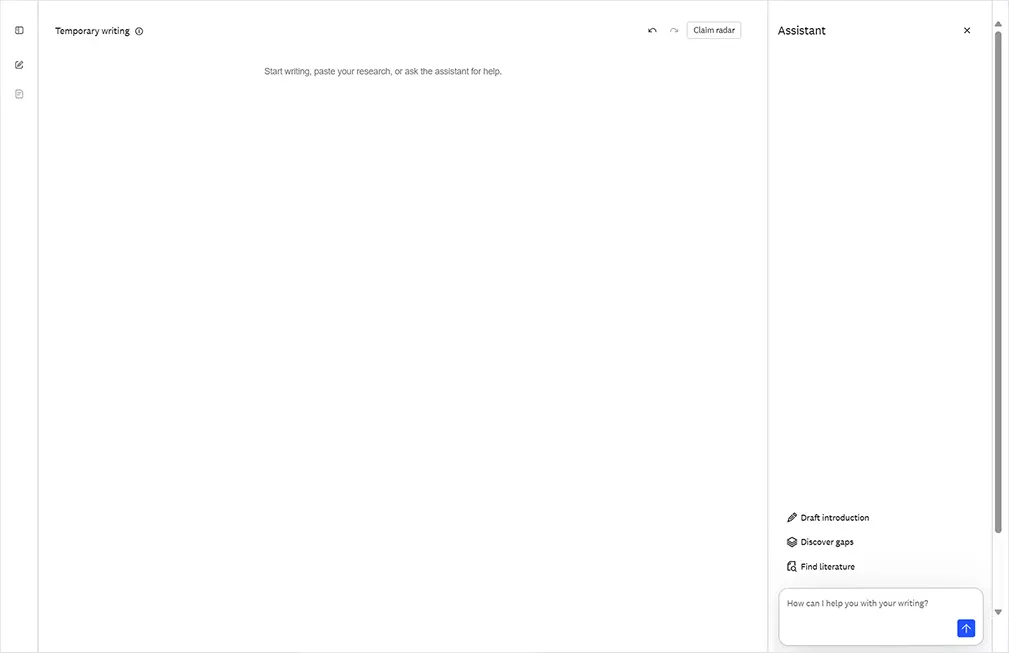
Fig. 1: Writing Coach homepage
To get started, just paste or draft text fragments in the open space provided, then add your prompts to the Assistant pane on the right of the screen.
Searches and synthesis are conducted by LeapSpace's proven search and retrieval system, while writing-aware AI agents help iteratively strengthen drafts and notes through dialog. You can also use LeapSpace’s Trust Card feature Claim Radar to batch analyze your claims—and those generated by the AI—against the wider published literature. Claim Radar surfaces sources that support, contradict or have a mixed response to each claim.
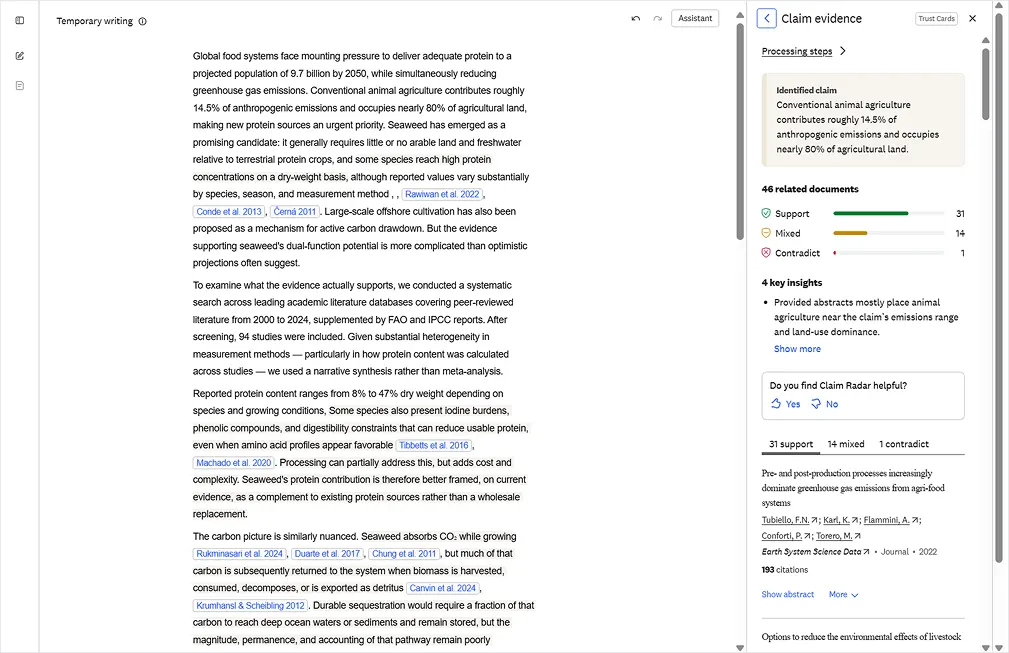
Fig. 2: Use Claim Radar with Writing Coach to batch analyze your claim
These steps help you craft stronger, clearer, more defensible arguments with greater confidence in the evidence behind them—all while retaining your own unique voice. Crucially, all Writing Coach responses are suggestions only. It’s up to you to actively accept or reject them.
Benefits of Writing Coach for researchers include:
Time savings: Replaces manual cross-checking against hundreds of research articles.
Peace of mind: Increases confidence in claim positioning.
More robust drafts: Writing Coach can help you contextualize reasoning, strengthen arguments and identify gaps.
A helpful kickstart: We know that facing a blank screen can be daunting. Writing Coach doesn’t seek to replace your writing, but it can inspire your first steps.
Precision AI, developed responsibly
Our vision for LeapSpace has always been to build out the support we provide across the research workflow—and that includes for the writing use case. But one of our guiding Responsible AI Principles is that we consider the real-world impact of our solutions on people. And with writing, there were several important things we knew we must avoid. For example, Writing Coach:
Doesn’t write articles for you; it’s a critique and contextualization workspace that supports your logic with the best arguments of others—without replacing your voice.
Doesn’t stifle original thinking; it seeks to inspire it by suggesting ideas related to your claims that you might not have considered.
Doesn’t confine you to your own domain; it encourages interdisciplinary exploration.
Isn’t designed to replace evaluation / peer review; it complements expert judgment.
Doesn’t add to the rising volume of “AI slop” (poor quality content generated by AI); it aims to reduce it.
Doesn’t ignore user privacy; it provides a space that is secure, encrypted and respects intellectual property.
Isn’t in control; it just surfaces information; final judgement always lies with you. No changes are made without your explicit permission.
Next steps
Writing Coach has a lot of potential and we are already exploring how we can continue to build upon that. We’ll be announcing further developments in the coming months.
Writing Coach is not the only new feature we are launching this month. Keep an eye out for an upcoming article on our powerful new LeapSpace Compare Tables capability.
Interested in learning more about LeapSpace?
Sign up for email updates to get the latest news and articles with best practices, user insights, and product updates.
Start exploring LeapSpaceopens in new tab/window today and strengthen your research drafts with Writing Coach.